On the Recent Issues with Zotero 8 and Better BibTex
If you are reading this, chances are that you have noticed that, in the past week, there has been quite a bit of uproar in the Zotero and Zettlr communities. Some users reported that Zettlr’s citation key autocomplete would suddenly stop working; others had issues with citation keys being gone from Zotero; and for some, Zettlr could either not open PDF attachments for citation keys or Zotero would outright crash.
We have decided to release this blog post to try to give a few guidances for Zettlr and Zotero users alike as to how to navigate these issues.
First to the good news: As of today, most of the issues seem to have been mostly solved, and Zotero 8 and Better BibTex seem to work well together again. Also, there should not have been any drastic data loss issues during that time.
Ensure Everything is Updated
In order to ensure that your Zotero and Zettlr setups are working well together, we recommend that you take an hour or so to update everything. Since many of our users and we ourselves have been affected by this, we believe the following steps should ensure that everything works well again:
- First, make absolutely sure that you have a backup of your exported library file (that you point Zettlr to). This can become useful later on if there has been an issue with your citation keys.
- Then, update to Zotero 8.0.4. This update has been released yesterday (March 6th) and this contains a few final fixes to ensure BBT, Zotero, and Zettlr work well again. Most importantly, this update will disable a set of BBT versions that have caused Zotero to outright crash.
- Once you have installed this update, open Zotero and head to “Tools” → “Plugins.” Here, you can view the status of your plugins. You might see that Better BibTex has been disabled. If that is the case, this is an indicator that you have one of the affected versions of BBT installed.
- To re-enable BBT, click on the plugin name to open its details. Then, click the cog icon on the top-right, click “Check for Updates.” This will show an indicator next to the three-dot-button (“…”) to the top-right of the BBT card. Click these three dots to open the context menu. This will now show a button that enables you to update the extension. Once this is done, the plugin should automatically be re-enabled.
- For good measure, restart Zotero now.
- Next, you should make sure that you still have all your citation keys. To confirm this, right-click the column headers of the main reference pane, and select the “Citation key” item to ensure that you see the citation keys for all your references.
- If that column is now empty, this means that your citation keys have been accidentally deleted. If you only used custom citation keys, you might now be in a form of predicament. Specifically, you may have to re-instate all your custom citation keys. Apparently, within the first five minutes of starting Zotero again after the BBT update, it will give you a menu item in the “Help” menu that allows you to redo the migration of your citation keys. If that doesn’t work, you’ll have to go the manual route. To do so, take a look at your backup of your citation file. This contains all CSL-items in JSON-format, and each item should have an
idfield. You will now have to manually copy over each key back to Zotero. - If you simply used the auto-generated citation keys (e.g.,
AuthorYear), this will be much simpler: Simply select all references in your library, right-click, and then select “Better BibTex” → “Regenerate BibTex key.” This will regenerate all your keys using the existing rules. This should essentially restore all keys automagically for you. - For good measure, you should also recreate your library file export, since that has been momentarily broken, too. To do so, open the preferences and navigate to the section “Automatic export.” Select your auto-export, and choose “Remove.” Quickly confirm and then recreate the automatic export. If you need guidance to re-enable the export, see our documentation on exporting your library.
- Confirm that the auto-export works by checking the modification date on your library date, which should be the current time. You may also want to add a new citation item now to check that it is included automatically in your library file, which is an indicator that automatic exports are working again.
- Now, everything should work. However, we also recommend updating Zettlr to the newly released version 4.2.1. We have made some improvements that will guard against any issues with potentially missing citation keys and make the app a bit more resilient when it comes to opening PDF attachments in the future. However, older releases of Zettlr should automatically work again with the new Zotero setup, so this is not strictly necessary.
Some Caveats
Even with these fixes and improvements, there are naturally some caveats, some of which we have already alluded to on the top.
- If you did not let Better BibTex automatically create the citation keys for you, but instead opted for a manual approach, you may have to manually transfer your keys back from a backup of your library file into Zotero, which can be quite time intensive.
- Even if everything worked well, double check any export you have, since we have observed some barely noticeable changes to the citation keys specifically the following: If you have two works released by the same author(s) in the same year, they will usually be disambiguated by appending letters to one of the keys. As an example, our main developer, Hendrik Erz, both has a preprint (released in August 2025) and his dissertation (released in September 2025). Both share the citation key
Erz2025. Before, since the preprint has been added first, the preprint had the citation keyErz2025, and the dissertation had the citation keyErz2025a. Now, however, since the preprint is sorted after the dissertation, these keys have switched. This can happen in various instances, so ensure you take this into account. Which leads to the next caveat: - Since this has been a quite impactful update, we absolutely recommend you double-check each citation key before submitting papers or theses. This is certainly an issue, but unfortunately unavoidable in the immediate aftermath of this chaos.
There may be additional caveats that we are unaware of. If you notice some oddities that we did not mention here, please let us know on our Discord or on our Community Forum so that we can update this post.
Technical Background
To finish this post, some observations we have made as to the reasons for this chaos.
For version 8.0, Zotero has finally included a native field for citation keys into its internal CSL format. Until now, citation keys were exclusively the work of Better BibTex. The Zotero developers have made sure to check each reference item for the existence of such a BBT key, and transferred them into the native citation key field.
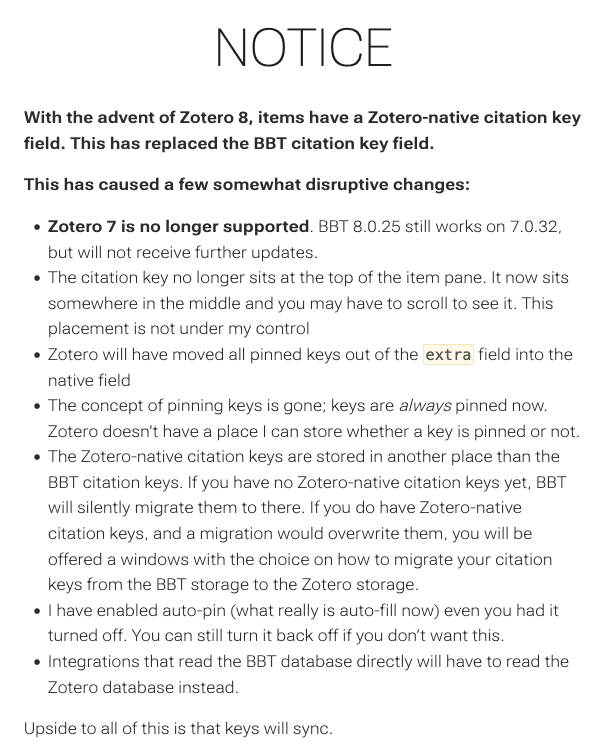
Nevertheless, there seem to have been other problems that Emiliano Heyns, the maintainer of BBT, has observed, which has led to a quick succession of updates to fix problems introduced by incompatibilities with Zotero 8. Indeed, the changes appear to have been so disruptive that the Better BibTex documentation currently features a very prominent warning at the top:
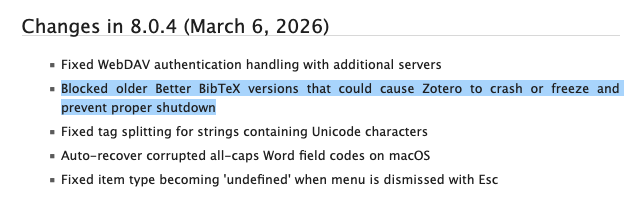
Furthermore, the problems have been noticed by the Zotero team as well, and this is the reason that the current version 8.0.4 explicitly disables Better BibTex versions known to have accidentally caused Zotero to crash:
We at Zettlr have learned about these issues early on, but it took us quite a few days to figure out what was going on. The first “canary” of the issues, so to speak, was a forum post opened almost three weeks ago. They reported that the citation autocorrect was not working properly. At first, we were unsure why that would happen, until a colleague sent us their broken library file. We immediately noticed an issue. When opening the file in a code editor, the very first line already showed the problem:
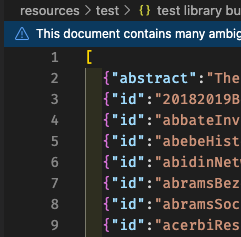
In exported CSL files, citation keys usually are placed within the id field. That was missing in this instance, and many others had similar issues. This was a beginning of about three weeks of bug-fixing on the side of mainly Zotero and Better BibTex to ensure both pieces of software work well together again.
On our side, we also have done our due diligence to harden Zettlr’s resilience when encountering malformed CSL items. More specifically, Zettlr now (beginning with version 4.2.1) does two things to improve usability:
- It no longer assumes that CSL files are well formatted. It now explicitly checks every item for the presence of the two required fields,
idandtype. If an item is missing any of these, Zettlr will produce an error in the logs to inform you of this, but load the rest of the library file without issues. - Zettlr now provides more insight when opening a PDF attachment goes wrong. Instead of assuming that the connection to the Better BibTex plugin’s server endpoint “just works,” it now checks every potential issue and provides richer feedback in the logs in case anything goes wrong.
Lessons Learned & Final Thoughts
What do we make of this? Well, first, we strongly believe and continue to operate under the assumption of benevolent behavior on all sides. We have no reason to believe, or even to suggest, that either the Zotero team or Better BibTex had any ill intentions here. We know both developer(s) or teams as reliable contributors to the Open Source ecosystem, and we strongly believe that this is just a chain of unfortunate events that led to this chaos. Indeed, both teams have worked hard to ensure proper interoperability in the past weeks, showing their dedication to the cause.
Nevertheless, this is still an example for why communication is so important. Since even we, the maintainers of Zettlr, only learned of these issues via forum posts of users reporting strange issues, shows that the communication could have been better. The fact that Zotero essentially sherlocked the one core feature that Better BibTex provided for many years at this point with little time for the plugin to adjust its own code and little indication in the changelog for all the thousands of users of Better BibTex demonstrates that the change hasn’t received the attention that it probably should have.
But this also shows that we at Zettlr need to do a much better job at observing the ecosystem we operate in to be prepared for any issues. We believe that nobody could’ve foreseen these huge hiccups in the migration, but we ourselves could have done a better job at preparing for this.
We apologize for any inconveniences that this episode has caused, but we are looking hopeful into the future. If this episode demonstrates anything, it is the resourcefulness and the resilience of an ecosystem not built on secrecy, but on openness.
If you have any further questions or concerns, we kindly invite you to get in touch with us via our social media channels, on Discord, or the forum. You can find all links at the bottom of this page.
See you around!